 CLOUD云计算
博客目前使用的是 DUX 主题,而 DUX 主题的后台设置页面采用的是 Options Framework 框架,由于自己经常会对主题做些修改,并且为了后期配置方便常常会在后台添加一些选项,这就需要我们对 Options Framework 有所了解,这篇文章也是为了帮助大家同时也是为了帮助自己更好地理解后台设置选项而写。

在了解这款插件之前,我想我们有必要对比一下默认不带主题选项的主题与采用 Options Framework 搭建主题设置选项的区别,下面是WordPress默认主题 Twenty Seventeen (当然了,WordPress官方是推荐使用“自定义”选项进行主题设置的,所以默认主题一般不会有主题设置面板)与我目前使用主题 DUX4.0 的后台设置界面,话不多说,从图中我们就可以看出二者的区别。
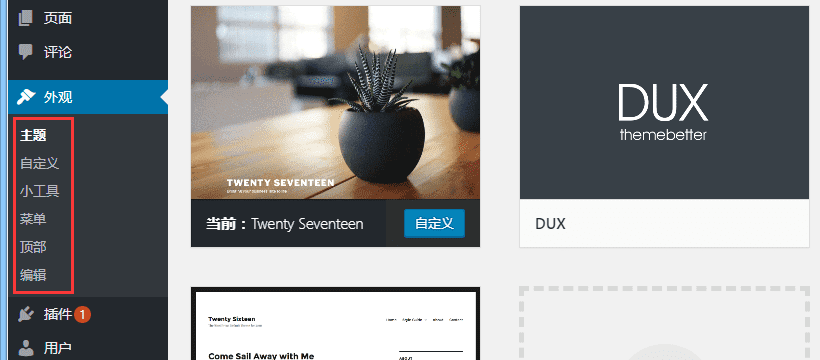
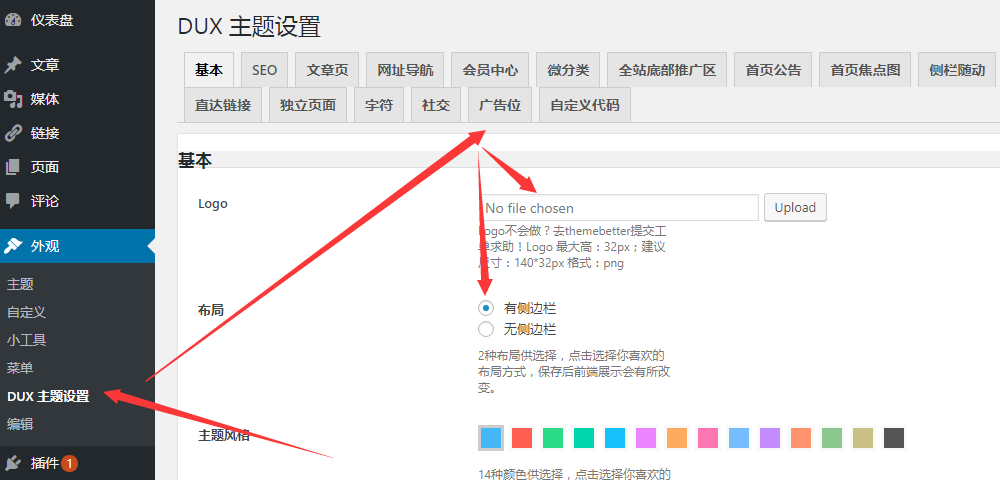
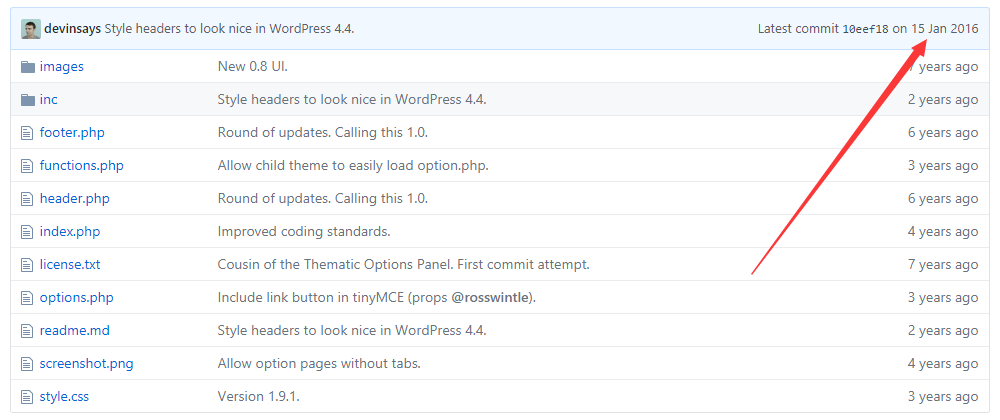
当然了,WordPress 后台主题设置相关的框架有很多, Options Framework 只是其中一个,不过从用户体验及操作难度上来看, Options Framework 可以说是相当优秀的,目前很多的主题都在使用它搭建自己的后台设置页面。 Options Framework 是美国德克萨斯州的一位著名的WordPress开发者 Devin Price 所开发的,最近更新是在2016年1月15日。该项目有主题版与插件版,也就是说如果你想为自己的插件添加一些后台设置选项时也可以使用它。下面是 Options Framework 主题版的项目截图,是不是很像一款主题?好吧,他就是一款主题,该项目通过一款主题展示后台主题设置选项。你可以直接上传它到你的主题文件夹下查看后台显示效果及各按钮如何使用等内容。
如何使用 Options Framework
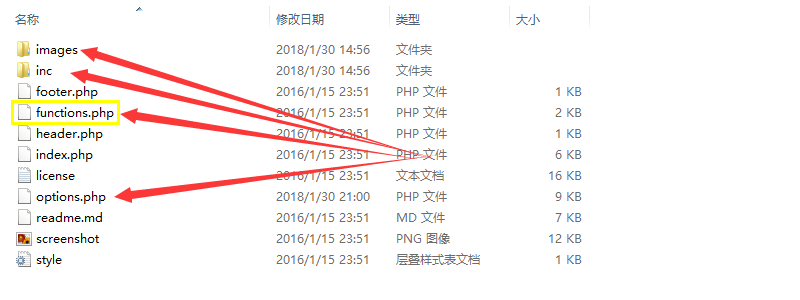
下载并解压 Options Framework Theme 后可以看到文件夹中主要包含上图所示的这些文件,我们只需要将images 文件夹、 inc 文件夹、options.php 文件复制到我们需要添加主题选项的主题中去,然后将 functions.php 文件中调用 inc 文件夹内容的部分复制到主题的 functions.php 文件中就可以了,具体代码如下:
/*
 * Loads the Options Panel
 *
 * If you're loading from a child theme use stylesheet_directory
 * instead of template_directory
 */

define( 'OPTIONS_FRAMEWORK_DIRECTORY', get_template_directory_uri() . '/inc/' );
require_once dirname( __FILE__ ) . '/inc/options-framework.php';
需要注意的是,对于默认主题一般已经有一个 inc 文件夹用于存放模板文件或其他一些 php 文件,为了避免冲突以及日后不好管理,我们可以将新复制的 inc 文件夹命名为 settings 或其他任何名称,同时需要将上述代码中的对应部分进行修改。另外,如果是子主题的话需要将 get_template_directory_uri() 替换为 get_stylesheet_directory_uri() ,具体原因请参见 WordPress路径函数总结,没有最全只有更全 一文。关于 Options Framework Theme 的使用,下面是作者做的一个视频大家也可以看一下。
这里我将文件复制到了默认主题 Twenty Seventeen 中,并将 inc 文件夹命名为了 settings ,刷新后台后可以看到外观面板下多了一个 Theme Options 的按钮,并且点击该按钮会出现一些已经预设好的按钮,我们可以通过查看这些按钮的相关代码了解其使用方法。

添加后台设置选项
Options Framework 的所有后台设置选项都存储在 options.php 文件中,我们就这个文件分三段进行简单说明。
/**
 * A unique identifier is defined to store the options in the database and reference them from the theme.
 */
function optionsframework_option_name() {
    // Change this to use your theme slug
    return 'options-framework-theme';
}
这地方是用于定义你的主题别名的,比如 DUX 主题的话,这里将 options-framework-theme 修改为了 DUX 。
/**
 * Defines an array of options that will be used to generate the settings page and be saved in the database.
 * When creating the 'id' fields, make sure to use all lowercase and no spaces.
 *
 * If you are making your theme translatable, you should replace 'theme-textdomain'
 * with the actual text domain for your theme. Read more:
 * http://codex.wordpress.org/Function_Reference/load_theme_textdomain
 */

function optionsframework_options() {

// Test data
 $test_array = array(
 'one' => __( 'One', 'theme-textdomain' ),
 'two' => __( 'Two', 'theme-textdomain' ),
 'three' => __( 'Three', 'theme-textdomain' ),
 'four' => __( 'Four', 'theme-textdomain' ),
 'five' => __( 'Five', 'theme-textdomain' )
 );

// Multicheck Array
 $multicheck_array = array(
 'one' => __( 'French Toast', 'theme-textdomain' ),
 'two' => __( 'Pancake', 'theme-textdomain' ),
 'three' => __( 'Omelette', 'theme-textdomain' ),
 'four' => __( 'Crepe', 'theme-textdomain' ),
 'five' => __( 'Waffle', 'theme-textdomain' )
 );

// Multicheck Defaults
 $multicheck_defaults = array(
 'one' => '1',
 'five' => '1'
 );

// Background Defaults
 $background_defaults = array(
 'color' => '',
 'image' => '',
 'repeat' => 'repeat',
 'position' => 'top center',
 'attachment'=>'scroll' );

// Typography Defaults
 $typography_defaults = array(
 'size' => '15px',
 'face' => 'georgia',
 'style' => 'bold',
 'color' => '#bada55' );

// Typography Options
 $typography_options = array(
 'sizes' => array( '6','12','14','16','20' ),
 'faces' => array( 'Helvetica Neue' => 'Helvetica Neue','Arial' => 'Arial' ),
 'styles' => array( 'normal' => 'Normal','bold' => 'Bold' ),
 'color' => false
 );

// Pull all the categories into an array
 $options_categories = array();
 $options_categories_obj = get_categories();
 foreach ($options_categories_obj as $category) {
 $options_categories[$category->cat_ID] = $category->cat_name;
 }

// Pull all tags into an array
 $options_tags = array();
 $options_tags_obj = get_tags();
 foreach ( $options_tags_obj as $tag ) {
 $options_tags[$tag->term_id] = $tag->name;
 }


 // Pull all the pages into an array
 $options_pages = array();
 $options_pages_obj = get_pages( 'sort_column=post_parent,menu_order' );
 $options_pages[''] = 'Select a page:';
 foreach ($options_pages_obj as $page) {
 $options_pages[$page->ID] = $page->post_title;
 }

// If using image radio buttons, define a directory path
 $imagepath = get_template_directory_uri() . '/images/';
上面这段代码主要是对后台主题设置界面的一些特殊参数的定义,包括文字样式、图片文件夹路径,常用的一些单选按钮,复选框等内容进行预定义,以方便后面具体内容设置时的调用。
$options[] = array(
    'name' => __( 'Basic Settings', 'theme-textdomain' ),
    'type' => 'heading'
);
$options[] = array(
    'name' => __( 'Input Text Mini', 'theme-textdomain' ),
    'desc' => __( 'A mini text input field.', 'theme-textdomain' ),
    'id' => 'example_text_mini',
    'std' => 'Default',
    'class' => 'mini',
    'type' => 'text'
);
$options[] = array(
    'name' => __( 'Input Text', 'theme-textdomain' ),
    'desc' => __( 'A text input field.', 'theme-textdomain' ),
    'id' => 'example_text',
    'std' => 'Default Value',
    'type' => 'text'
);
$options[] = array(
    'name' => __( 'Input with Placeholder', 'theme-textdomain' ),
    'desc' => __( 'A text input field with an HTML5 placeholder.', 'theme-textdomain' ),
    'id' => 'example_placeholder',
    'placeholder' => 'Placeholder',
    'type' => 'text'
);
$options[] = array(
    'name' => __( 'Textarea', 'theme-textdomain' ),
    'desc' => __( 'Textarea description.', 'theme-textdomain' ),
    'id' => 'example_textarea',
    'std' => 'Default Text',
    'type' => 'textarea'
);
$options[] = array(
    'name' => __( 'Input Select Small', 'theme-textdomain' ),
    'desc' => __( 'Small Select Box.', 'theme-textdomain' ),
    'id' => 'example_select',
    'std' => 'three',
    'type' => 'select',
    'class' => 'mini', //mini, tiny, small
    'options' => $test_array
);
$options[] = array(
    'name' => __( 'Input Select Wide', 'theme-textdomain' ),
    'desc' => __( 'A wider select box.', 'theme-textdomain' ),
    'id' => 'example_select_wide',
    'std' => 'two',
    'type' => 'select',
    'options' => $test_array
);
if ( $options_categories ) {
    $options[] = array(
        'name' => __( 'Select a Category', 'theme-textdomain' ),
        'desc' => __( 'Passed an array of categories with cat_ID and cat_name', 'theme-textdomain' ),
        'id' => 'example_select_categories',
        'type' => 'select',
        'options' => $options_categories
    );
}
if ( $options_tags ) {
    $options[] = array(
        'name' => __( 'Select a Tag', 'options_check' ),
        'desc' => __( 'Passed an array of tags with term_id and term_name', 'options_check' ),
        'id' => 'example_select_tags',
        'type' => 'select',
        'options' => $options_tags
    );
}
$options[] = array(
    'name' => __( 'Select a Page', 'theme-textdomain' ),
    'desc' => __( 'Passed an pages with ID and post_title', 'theme-textdomain' ),
    'id' => 'example_select_pages',
    'type' => 'select',
    'options' => $options_pages
);
$options[] = array(
    'name' => __( 'Input Radio (one)', 'theme-textdomain' ),
    'desc' => __( 'Radio select with default options "one".', 'theme-textdomain' ),
    'id' => 'example_radio',
    'std' => 'one',
    'type' => 'radio',
    'options' => $test_array
);
$options[] = array(
    'name' => __( 'Example Info', 'theme-textdomain' ),
    'desc' => __( 'This is just some example information you can put in the panel.', 'theme-textdomain' ),
    'type' => 'info'
);
$options[] = array(
    'name' => __( 'Input Checkbox', 'theme-textdomain' ),
    'desc' => __( 'Example checkbox, defaults to true.', 'theme-textdomain' ),
    'id' => 'example_checkbox',
    'std' => '1',
    'type' => 'checkbox'
);
$options[] = array(
    'name' => __( 'Advanced Settings', 'theme-textdomain' ),
    'type' => 'heading'
);
$options[] = array(
    'name' => __( 'Check to Show a Hidden Text Input', 'theme-textdomain' ),
    'desc' => __( 'Click here and see what happens.', 'theme-textdomain' ),
    'id' => 'example_showhidden',
    'type' => 'checkbox'
);
$options[] = array(
    'name' => __( 'Hidden Text Input', 'theme-textdomain' ),
    'desc' => __( 'This option is hidden unless activated by a checkbox click.', 'theme-textdomain' ),
    'id' => 'example_text_hidden',
    'std' => 'Hello',
    'class' => 'hidden',
    'type' => 'text'
);
$options[] = array(
    'name' => __( 'Uploader Test', 'theme-textdomain' ),
    'desc' => __( 'This creates a full size uploader that previews the image.', 'theme-textdomain' ),
    'id' => 'example_uploader',
    'type' => 'upload'
);
$options[] = array(
    'name' => "Example Image Selector",
    'desc' => "Images for layout.",
    'id' => "example_images",
    'std' => "2c-l-fixed",
    'type' => "images",
    'options' => array(
        '1col-fixed' => $imagepath . '1col.png',
        '2c-l-fixed' => $imagepath . '2cl.png',
        '2c-r-fixed' => $imagepath . '2cr.png'
    )
);
$options[] = array(
    'name' => __( 'Example Background', 'theme-textdomain' ),
    'desc' => __( 'Change the background CSS.', 'theme-textdomain' ),
    'id' => 'example_background',
    'std' => $background_defaults,
    'type' => 'background'
);
$options[] = array(
    'name' => __( 'Multicheck', 'theme-textdomain' ),
    'desc' => __( 'Multicheck description.', 'theme-textdomain' ),
    'id' => 'example_multicheck',
    'std' => $multicheck_defaults, // These items get checked by default
    'type' => 'multicheck',
    'options' => $multicheck_array
);
$options[] = array(
    'name' => __( 'Colorpicker', 'theme-textdomain' ),
    'desc' => __( 'No color selected by default.', 'theme-textdomain' ),
    'id' => 'example_colorpicker',
    'std' => '',
    'type' => 'color'
);
$options[] = array( 'name' => __( 'Typography', 'theme-textdomain' ),
    'desc' => __( 'Example typography.', 'theme-textdomain' ),
    'id' => "example_typography",
    'std' => $typography_defaults,
    'type' => 'typography'
);
$options[] = array(
    'name' => __( 'Custom Typography', 'theme-textdomain' ),
    'desc' => __( 'Custom typography options.', 'theme-textdomain' ),
    'id' => "cu